Google added “platform properties” to Search Console. You can now connect your Instagram, TikTok, X (Twitter), and YouTube accounts and see how your posts perform on Google Search and Discover. Track clicks, impressions, top queries, and traffic trends per platform. But here is the catch: the feature is rolling out gradually over several weeks. Not everyone can see it yet. If you do not see the platform option when you click “Add property,” your account has not been included in the rollout yet. Data only starts collecting from the day you verify, so the earlier you get in, the more data you capture. Here is exactly what the feature does, how to set it up, and what to do while you wait.
Table of Contents
- What Google Announced
- Three Reports Available in Search Console
- Supported Platforms
- How to Set Up a Platform Property
- Who Should Use Platform Properties
- Why This Matters
- Why You Cannot See Platform Properties Yet
- Frequently Asked Questions
1. What Google Announced
Google published a blog post on July 6, 2026 introducing platform properties, a new property type in Search Console that shows how content from social media and video platforms performs on Google Search and Discover.
The post was written by Moshe Samet, Product Manager Lead for Search Console. This follows an earlier experiment Google ran in December 2025 called “social channels in Search Console.”
The idea is simple. Content creators and publishers use many channels beyond their own websites — Instagram, TikTok, X, YouTube — to reach audiences. Until now, there was no single place to see how that content performed on Google Search. Platform properties give you that view.

2. Three Reports Available in Search Console
After adding a platform property and verifying it, you get three reports inside Search Console:
Performance Report
Shows total clicks, impressions, and other metrics for your connected platform account. You can filter and sort by individual posts or search queries to see which content drives the most traffic. Data can also be exported for analysis in other tools.
Insights Report
Gives a high-level overview of recent traffic trends, your top-performing posts, and how people discover your account on Google Search. Useful for a quick weekly or monthly health check on your social content’s search performance.
Achievements
Tracks growth milestones — like reaching a certain number of clicks from Google Search in the last 28 days. A gamification element that helps you measure progress over time.
3. Supported Platforms
At launch, four platforms are available:
- TikTok
- X (formerly Twitter)
- YouTube
Each platform requires its own verification step to securely authorize the connection between Search Console and your account.
4. How to Set Up a Platform Property
The setup process takes about two minutes per platform. Here is exactly what to do:
Step 1 — Open Search Console
Go to search.google.com/search-console.
Step 2 — Start Adding a Property
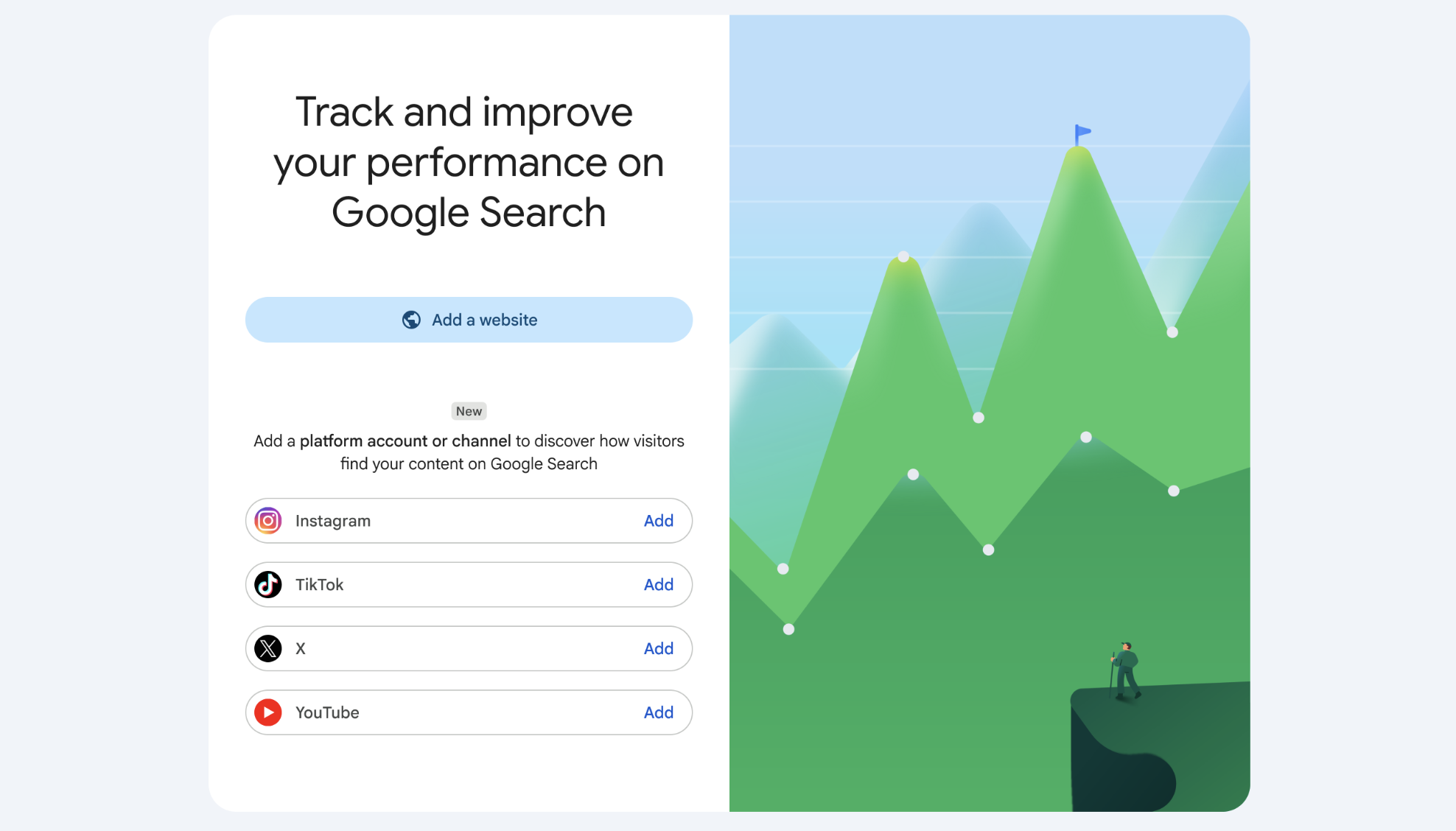
Go to the Search Console verification page. Alternatively, open the property selector dropdown anywhere in Search Console and click “Add property”.
Step 3 — Select Your Platform
Choose one of the four available platforms: Instagram, TikTok, X, or YouTube.
Step 4 — Verify Ownership
Follow the on-screen steps to verify that you own the account. This typically involves logging into the platform and authorizing Search Console to access your data.
Step 5 — Repeat for Other Platforms
Add each platform as a separate property. You can manage them all from the Search Console property selector.
Google says the platform properties feature will become available gradually over the coming weeks. If you do not see it yet, check back.
5. Who Should Use Platform Properties
- Content creators who post on Instagram, TikTok, X, or YouTube and want to see how their content appears in Google Search
- SEO professionals tracking brand visibility across social platforms in organic search
- Publishers and media companies with large social followings looking to understand cross-channel discovery
- Digital marketers reporting on social content performance beyond platform-native analytics
- Site owners without a website — Google specifically says creators who do not have their own website can now use Search Console for the first time
Using Search Console data effectively is a skill the free SEO in 30 Days course covers in its technical precision module — including how to read performance reports and turn search query data into content decisions.
6. Why This Matters
Search Console has historically been a tool for website owners. You needed a domain or URL prefix to use it. Platform properties change that. A creator who only posts on YouTube or TikTok can now access Search Console data and see how their content gets discovered on Google Search.
For businesses and agencies, this fills a reporting gap. Social media analytics show engagement within the platform but not search discovery. Google Search Console now gives you the search side of the picture — which queries bring people to your Instagram profile or YouTube video from Google, how often, and which posts win.
This also signals that Google indexes and surfaces social media content more prominently than before. Instagram posts, TikTok videos, X threads, and YouTube content already appear in Google Search and Discover results. Platform properties make that data visible to the people who create that content.
7. Why You Cannot See Platform Properties Yet
If you opened Search Console after reading about this feature and could not find the platform options, you are not alone. Here is what is happening and what you can do about it.
The Feature Is Rolling Out Gradually
Google confirmed this in both the announcement blog post and the Help Center: platform properties are being released in stages over several weeks. This is standard for Search Console launches. A small group of accounts gets access first, and coverage expands as Google validates the data pipeline. If you do not see it yet, your account is simply not in the current wave.
Where to Check
The platform option does not appear as a separate menu item. You must:
- Open Search Console
- Click the property selector dropdown (top left corner)
- Click “Add property”
- Look for the platform options — Instagram, TikTok, X, YouTube
If you do not see platform options in that list, the feature has not reached your account yet. Do not keep refreshing. The rollout runs on Google’s side, not yours.
No Backfill — Every Day of Waiting Costs You Data
Search Console does not backdate data. Reports start collecting from the moment you verify. If you wait two weeks for the feature to appear before connecting your account, you will have permanently lost two weeks of search performance data. Google’s Help Center confirms that new platform properties show “empty charts” initially and “it takes a few days to collect and process performance metrics after setup.”
Some Accounts May Be Pre-Matched
Several SEO professionals reported that their X (Twitter) accounts appeared automatically without manual verification. Google appears to be pre-matching some public profiles to known Google identities, especially for users who already set up a Search creator profile in June 2026. If your account gets auto-recognized, the property may appear on its own once your account enters the rollout.
What To Do While You Wait
- Check access daily. Open Search Console, click the property selector, and look for the platform options. Once it appears, verify immediately.
- Prepare your accounts. Make sure you have login credentials for every Instagram, TikTok, X, and YouTube account your team runs. The verification process uses standard OAuth — you log into each platform and authorize the connection.
- List all your accounts. If your team manages multiple brand accounts across platforms, write down which email each one uses. You will need to verify each account separately.
- Brief your reporting team. Let the person who handles analytics know that a new data source is coming. Plan how to incorporate platform property data into weekly or monthly reports.
- Set up a billing contact in Search Console. Adding alternate contacts ensures your team receives notifications when new features or data updates become available.
The most important takeaway: verify the second you see the option. Every day of delay is a day of data you will never get back.
8. Frequently Asked Questions
Is platform properties free?
Yes. It is part of Search Console, which is free.
Do I need a website to use platform properties?
No. This is the first time Google allows a Search Console property without a website. You can add your social media account directly.
What data does Search Console show for my social accounts?
Clicks, impressions, top queries, top posts, and traffic trends from Google Search and Discover. The exact metrics depend on which report you use (Performance, Insights, or Achievements).
Does this work for Facebook or LinkedIn?
Not at launch. The four supported platforms are Instagram, TikTok, X, and YouTube.
When will this be available?
Google says it will roll out gradually over the coming weeks. There is no way to request early access or join a waitlist. If it is not available on your Search Console account yet, check back in a few days.
I opened Search Console but do not see the option to add a platform. What am I missing?
You are not missing anything. Open the property selector dropdown in the top left corner of Search Console and click “Add property.” If platform options (Instagram, TikTok, X, YouTube) do not appear in the property type list, your account has not been included in the rollout yet. Check again in a few days.
Will I lose data if I do not connect my accounts immediately?
Yes. Search Console does not backfill data. Reports start from the date you verify. If you connect your account a month after the feature rolls out to you, you will have zero data for that first month.
Does the feature require a specific type of Google account?
Google has not stated any account type restrictions. Standard Google accounts, Google Workspace accounts, and Brand accounts should all be eligible once the rollout reaches them.
Can I add a platform property from a mobile device?
Search Console works in mobile browsers but the full property selector and verification flow are easier to complete on a desktop or tablet.
Can I connect multiple accounts from the same platform?
Yes. Each account is added as a separate platform property.
Do I need to verify each platform separately?
Yes. Each platform requires its own verification step to authorize the connection.
What To Do Next
If you can see the platform option:
- Connect your Instagram, TikTok, X, and YouTube accounts immediately
- Check the Performance report first — see which search queries already bring people to your social content
- Export the data to establish a baseline before the 28-day window shifts
- Set a monthly reminder to review the Insights report for traffic trends
If you cannot see the platform option yet:
- Check the property selector dropdown once a week (not daily — the rollout runs on Google’s schedule)
- Prepare your account credentials now so you can verify the moment access appears
- Accept that you will miss some early data. The sooner you catch it, the less you lose
Source: See how content from social and video platforms performs on Google Search — Google Search Central Blog, July 6, 2026. Additional details from the Google Search Console Help Center.